
How Do I Add Social Media & Music Streaming Links to My Composer Profile?
Connecting your social media and music streaming profiles is essential for building your presence on Compozly. It allows video creators, filmmakers and collaborators to verify your identity, explore your full discography, and connect with you across the web.
This guide will show you how to correctly format and add these links to your Composer profile.
⚠️ Important: This feature is exclusive to the Compozly Maestro plan. You must have an active Maestro subscription to add custom links to your profile. To upgrade or learn more, please visit:
Accessing the Links Section
- Log in to your Compozly account.
- Navigate to your Edit Profile page.
- Scroll down until you see the section titled Links.
- Click the dropdown arrow to expand the section if it is not already visible.
As shown in the example below, you will see three distinct categories: Music Streaming, Social Media, and Website & IMDB.
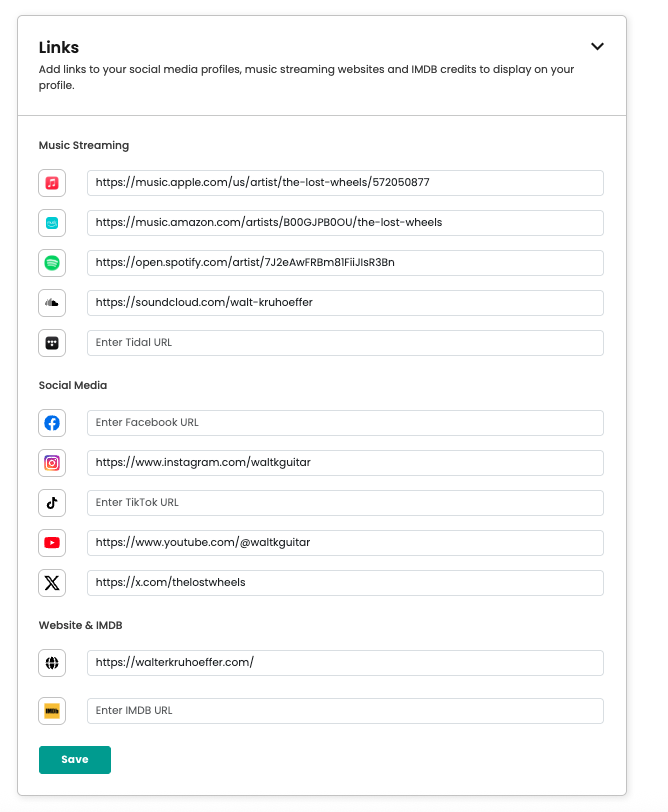
URL Formatting Guide
To ensure your links work correctly, they must be formatted according to specific standards. Below is a guide on the correct and incorrect ways to format links for each platform.
Music Streaming
Share your artist profiles or specific albums/playlists.
Apple Music
Ensure you link to an artist page or a specific album.
- ✅ Valid:
https://music.apple.com/us/artist/example/115234 - ✅ Valid:
https://music.apple.com/us/album/inception-music-from-the-motion-picture/1440853968 - ❌ Invalid:
https://apple.com/music(Do not link to the Apple homepage)
Amazon Music
- ✅ Valid:
https://music.amazon.com/artists/B000QKDW4K - ✅ Valid:
https://amazon.com/music/player/artists/B000QKDW4K - ❌ Invalid:
https://amazon.com/products
Spotify
Please provide the direct link to your Artist profile.
- ✅ Valid:
https://open.spotify.com/artist/0YC192cP3KPCRWx8zr8MfZ - ❌ Invalid:
https://spotify.ly/abc123
SoundCloud
You can link to your main profile, a track, or a set.
- ✅ Valid:
https://soundcloud.com/example - ✅ Valid:
https://soundcloud.com/example/time - ✅ Valid:
https://soundcloud.com/user-123/sets/my-playlist - ❌ Invalid:
https://soundcloud.com/(Do not use the homepage URL)
Tidal
- ✅ Valid:
https://tidal.com/browse/artist/3566315 - ✅ Valid:
https://listen.tidal.com/artist/3566315 - ✅ Valid:
https://tidal.com/browse/album/123456 - ❌ Invalid:
https://tidal.com/home
Social Media
Help users find you on your most active social channels.
-
✅ Valid:
https://facebook.com/example -
✅ Valid:
https://www.facebook.com/example -
✅ Valid:
https://fb.com/example -
❌ Invalid:
https://facebook.com/
-
✅ Valid:
https://instagram.com/example -
✅ Valid:
https://www.instagram.com/example -
✅ Valid:
https://instagr.am/example -
❌ Invalid:
https://instagram.com/
TikTok
Note: You must include the ‘@’ symbol in the URL for TikTok links.
-
✅ Valid:
https://tiktok.com/@example -
✅ Valid:
https://www.tiktok.com/@composer_music -
❌ Invalid:
https://tiktok.com/example(Missing the ‘@’) -
❌ Invalid:
https://vm.tiktok.com/abc123(Mobile short links are not supported)
YouTube
Link to your channel, not a specific video.
-
✅ Valid:
https://youtube.com/@example -
✅ Valid:
https://youtube.com/channel/UCmKurapML4BF9Bjtj4RbvXw -
✅ Valid:
https://youtube.com/c/example -
✅ Valid:
https://youtube.com/user/example -
✅ Valid:
https://youtu.be/RxabLA7UQ9k -
❌ Invalid:
https://youtube.com/watch?v=abc123(Do not link to a single video watch page)
X (Twitter)
-
✅ Valid:
https://x.com/example -
✅ Valid:
https://twitter.com/example -
✅ Valid:
https://www.x.com/composer_music -
❌ Invalid:
https://x.com/
Website & IMDB
Provide professional context and credits.
Website
-
✅ Valid:
https://www.example.com -
✅ Valid:
https://example.com -
✅ Valid:
http://example.com/portfolio -
✅ Valid:
www.composer-music.com -
❌ Invalid:
example(Must include the domain) -
❌ Invalid:
just some text
IMDB
Ensure you are linking to a “Name” page, not a “Title” or “Pro” page.
-
✅ Valid:
https://www.imdb.com/name/nm0001877/ -
✅ Valid:
https://imdb.com/name/nm0001877 -
✅ Valid:
www.imdb.com/name/nm0001877/ -
❌ Invalid:
https://imdb.pro/name/nm123(IMDB Pro links are not supported)
Saving Your Changes
Once you have entered your URLs, be sure to click the teal Save button at the bottom of the section to publish your changes.